

Jade Bahr
Members
-
Joined
-
Last visited
Everything posted by Jade Bahr
-
 @Lilja K @Matt! so good highly recommend Also can't believe sayin this but this kid Owen Cooper (it's his freakin debut) outacted Colin Farrell easily in The Penguin I'm speechless
 -
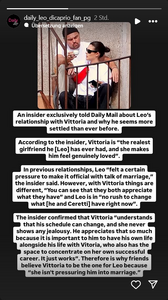
EXCLUSIVE Insiders spill Leonardo DiCaprio and Vittoria Ceretti's big relationship secret... and the intimate reason he broke his 'under 25 rule'
-
I really hope it will happen this time 🤞 ‘Devil In The White City’ Movie Revived At 20th Century With Leonardo DiCaprio And Martin Scorsese Eyeing Reunion But without even having a script (same for the Hawaiin mobster movie) I highly doubt it.
-
-
Can't wait to finally watch
-
Always down for a good rom com
Dunno what to think about this project.... @Lilja K
1. One Battle After Another 2. The Devil In The White City 3. Home 4. Evel Knievel 5. Sinatra 6. The Wager 7. Untitled Johnson/Blunt mobster movie (I just hope Leo won't be involved in the final movie sorry not sorry 😆)
^ https://www.theguardian.com/film/2025/mar/14/cancer-gave-me-clarity-industry-star-marisa-abela-on-surviving-serious-illness-playing-posh-and-on-screen-nudity
Probably not really a suprise but OBAA won't come to Cannes.
Johnson kinda confirming the project?
Account
Navigation
Search
Configure browser push notifications
Chrome (Android)
- Tap the lock icon next to the address bar.
- Tap Permissions → Notifications.
- Adjust your preference.
Chrome (Desktop)
- Click the padlock icon in the address bar.
- Select Site settings.
- Find Notifications and adjust your preference.
Safari (iOS 16.4+)
- Ensure the site is installed via Add to Home Screen.
- Open Settings App → Notifications.
- Find your app name and adjust your preference.
Safari (macOS)
- Go to Safari → Preferences.
- Click the Websites tab.
- Select Notifications in the sidebar.
- Find this website and adjust your preference.
Edge (Android)
- Tap the lock icon next to the address bar.
- Tap Permissions.
- Find Notifications and adjust your preference.
Edge (Desktop)
- Click the padlock icon in the address bar.
- Click Permissions for this site.
- Find Notifications and adjust your preference.
Firefox (Android)
- Go to Settings → Site permissions.
- Tap Notifications.
- Find this site in the list and adjust your preference.
Firefox (Desktop)
- Open Firefox Settings.
- Search for Notifications.
- Find this site in the list and adjust your preference.