
Jade Bahr
Members
-
Joined
-
Last visited
Everything posted by Jade Bahr
-
 ^ British VogueGwyneth’s Second Coming: “I’m Much Easier On Myself, I Wo...Oscar-winning megastar, CEO of gorgeous living, unofficial divorce guru… for three decades no one has fascinated – and flabbergasted – quite like Gwyneth Paltrow. As the eternal style inspiration make
This looks... intense.
It's a curious case because compared to most other movies nowadays it is a success. The only thing that makes it not it's the bloated budget. Box Office: ‘Good Fortune’ and ‘After the Hunt’ Bomb — ‘Smashing Machine’ -82% Drop, ‘Kiss of the Spider-Woman’ -80%, ‘Tron’ -70%
^he's so handsome and stylish @Lilja K TOM BLYTH photographed by Gracie Newman (2025).
Suddenly this project feels a lot less appealing Michael Mann Says ‘Heat 2’ Will Use AI and De-Aging Technology — Plans 2027 Release in 4000+ Screens Hollywood is eating itself alive over AI, and Michael Mann has decided to jump straight into the fire. Speaking during a masterclass at the Lumiere Film Festival (via Variety), Mann confirmed that AI and digital de-aging tools will play a key role in “Heat 2. If there’s a way for Mann to destroy any goodwill he had with the online mob then this will surely do it. Is this a good idea? It’ll put Mann squarely in the center of one of Hollywood’s fiercest cultural wars. Add in de-aging technology, which divided audiences in “The Irishman” and “Indiana Jones and the Dial of Destiny,” and you have a perfect storm of controversy Mann went on to confirm that “Heat 2” would jump across timelines, exploring both before and after the events of the original film. “It picks up one day after the movie ends — only Val Kilmer’s alive, and he has to flee the United States,” Mann revealed. Production-wise, Mann confirmed “Heat 2” made the jump from Warner Bros. to Amazon MGM’s United Artists, with producer Scott Stuber, which in his own words will ensure the “proper size and scale” for what he implies is a very costly movie. In case anybody’s worried about Amazon/MGM not giving “Heat 2” the proper release in theaters, Mann responded by saying it’ll be quite the opposite— expect a robust rollout in 2027: Beyond “Heat 2,” Mann is also eyeing a Vietnam War project based on Mark Bowden’s Hue 1968, a multi-perspective epic he described as “like Rashomon.” However, for now, all eyes are on “Heat 2.” If Mann wants backlash from an industry that’s already triggered by any mention of the technology, then he’ll experiment with AI, and aim to legitimize the technology as a new cinematic tool.
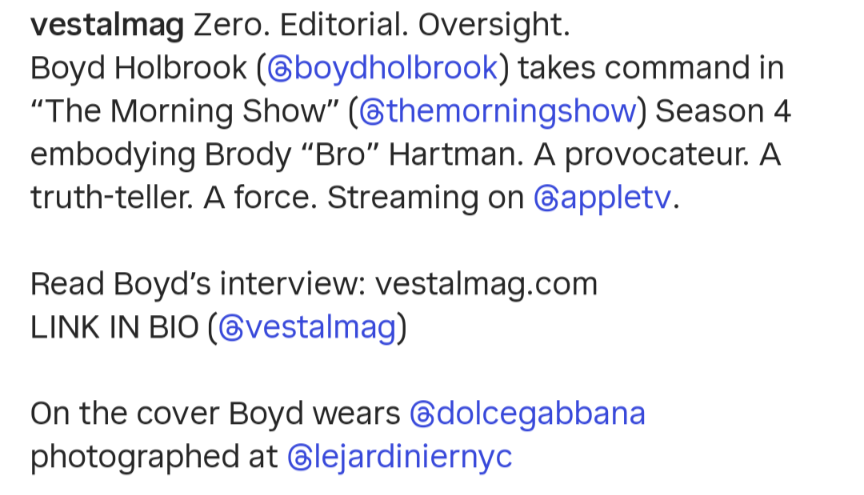
Dayum @Lilja K Can't wait to watch the new season of TMS with him 🤩
^ British VogueGwyneth’s Second Coming: “I’m Much Easier On Myself, I Wo...Oscar-winning megastar, CEO of gorgeous living, unofficial divorce guru… for three decades no one has fascinated – and flabbergasted – quite like Gwyneth Paltrow. As the eternal style inspiration make
This looks... intense.
It's a curious case because compared to most other movies nowadays it is a success. The only thing that makes it not it's the bloated budget. Box Office: ‘Good Fortune’ and ‘After the Hunt’ Bomb — ‘Smashing Machine’ -82% Drop, ‘Kiss of the Spider-Woman’ -80%, ‘Tron’ -70%
^he's so handsome and stylish @Lilja K TOM BLYTH photographed by Gracie Newman (2025).
Suddenly this project feels a lot less appealing Michael Mann Says ‘Heat 2’ Will Use AI and De-Aging Technology — Plans 2027 Release in 4000+ Screens Hollywood is eating itself alive over AI, and Michael Mann has decided to jump straight into the fire. Speaking during a masterclass at the Lumiere Film Festival (via Variety), Mann confirmed that AI and digital de-aging tools will play a key role in “Heat 2. If there’s a way for Mann to destroy any goodwill he had with the online mob then this will surely do it. Is this a good idea? It’ll put Mann squarely in the center of one of Hollywood’s fiercest cultural wars. Add in de-aging technology, which divided audiences in “The Irishman” and “Indiana Jones and the Dial of Destiny,” and you have a perfect storm of controversy Mann went on to confirm that “Heat 2” would jump across timelines, exploring both before and after the events of the original film. “It picks up one day after the movie ends — only Val Kilmer’s alive, and he has to flee the United States,” Mann revealed. Production-wise, Mann confirmed “Heat 2” made the jump from Warner Bros. to Amazon MGM’s United Artists, with producer Scott Stuber, which in his own words will ensure the “proper size and scale” for what he implies is a very costly movie. In case anybody’s worried about Amazon/MGM not giving “Heat 2” the proper release in theaters, Mann responded by saying it’ll be quite the opposite— expect a robust rollout in 2027: Beyond “Heat 2,” Mann is also eyeing a Vietnam War project based on Mark Bowden’s Hue 1968, a multi-perspective epic he described as “like Rashomon.” However, for now, all eyes are on “Heat 2.” If Mann wants backlash from an industry that’s already triggered by any mention of the technology, then he’ll experiment with AI, and aim to legitimize the technology as a new cinematic tool.
Dayum @Lilja K Can't wait to watch the new season of TMS with him 🤩













 I bought OBAA shirts ... One for my man (because he loves Benicio and a good beer 🤣) ... and one for me 🥰 Love them 🤩
 At least she has a decent taste in movies LOL
Love how he looks like a complete different person 🤯 First look at Charlie Hunnam on the set of MONSTER: Lizzie Borden.
At least she has a decent taste in movies LOL
Love how he looks like a complete different person 🤯 First look at Charlie Hunnam on the set of MONSTER: Lizzie Borden.Account
Navigation
Search
Configure browser push notifications
Chrome (Android)
- Tap the lock icon next to the address bar.
- Tap Permissions → Notifications.
- Adjust your preference.
Chrome (Desktop)
- Click the padlock icon in the address bar.
- Select Site settings.
- Find Notifications and adjust your preference.
Safari (iOS 16.4+)
- Ensure the site is installed via Add to Home Screen.
- Open Settings App → Notifications.
- Find your app name and adjust your preference.
Safari (macOS)
- Go to Safari → Preferences.
- Click the Websites tab.
- Select Notifications in the sidebar.
- Find this website and adjust your preference.
Edge (Android)
- Tap the lock icon next to the address bar.
- Tap Permissions.
- Find Notifications and adjust your preference.
Edge (Desktop)
- Click the padlock icon in the address bar.
- Click Permissions for this site.
- Find Notifications and adjust your preference.
Firefox (Android)
- Go to Settings → Site permissions.
- Tap Notifications.
- Find this site in the list and adjust your preference.
Firefox (Desktop)
- Open Firefox Settings.
- Search for Notifications.
- Find this site in the list and adjust your preference.