All Activity
- Past hour
-

-
 dior haute-couture fw2000
-
 Nalú is 25 years old and was born and raised in Brazil. “So grateful to be able to call Rio home, even with all the inequality and difficulty, growing up here has made me who I am today. It isn’t perfect here, but it is still the place that fills my heart with joy,” she wrote in an Instagram post she shared in March.






 dolce & gabbana ss2000
- Yesterday
versace menswear s/s 2006

 versace menswear ss2006

 some resolution bumps... Vicky Saperstein: joy at carolinaherrera with kelseymerritt 🤍


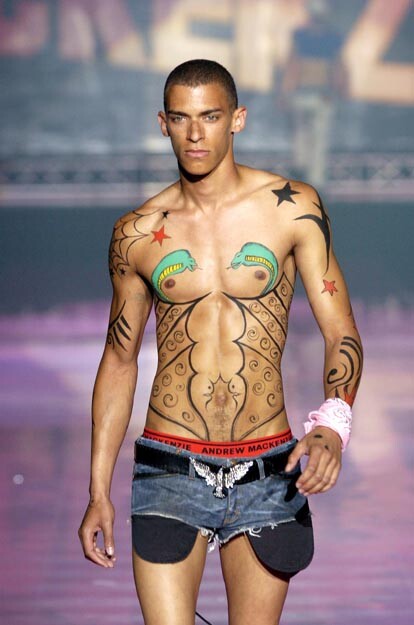
 andrew mackenzie s/s 2005
 andrew mackenzie ss 2005


 A self-presentation video courtesy of Next Miami: JTerry - Next - 20250828_173449661.mp4 A small number of photos from Guess' IG, plus a cleverly edited morphing clothing video: JTerry - Guess - 2025-11-24_1080x1920 (Morphing).mp4 It's not much, but hopefully I can find more over time (another poster on Bellazon mentioned how difficult it is to keep up with so many brands, and with so many model & influencer social media accounts).



 Carolina Herrera show during New York Fashion Week 2026



 andrew mackenzie s/s 2005 warning: nudity

 IMDbTogether (2025) ⭐ 6.7 | Horror, Romance1h 42m | 15..is now available on Hulu/HBO/HBO Max/Max/HBO/idk anymore
andrew mackenzie ss 2005
IMDbTogether (2025) ⭐ 6.7 | Horror, Romance1h 42m | 15..is now available on Hulu/HBO/HBO Max/Max/HBO/idk anymore
andrew mackenzie ss 2005






























































































Account
Navigation
Search
Configure browser push notifications
Chrome (Android)
- Tap the lock icon next to the address bar.
- Tap Permissions → Notifications.
- Adjust your preference.
Chrome (Desktop)
- Click the padlock icon in the address bar.
- Select Site settings.
- Find Notifications and adjust your preference.
Safari (iOS 16.4+)
- Ensure the site is installed via Add to Home Screen.
- Open Settings App → Notifications.
- Find your app name and adjust your preference.
Safari (macOS)
- Go to Safari → Preferences.
- Click the Websites tab.
- Select Notifications in the sidebar.
- Find this website and adjust your preference.
Edge (Android)
- Tap the lock icon next to the address bar.
- Tap Permissions.
- Find Notifications and adjust your preference.
Edge (Desktop)
- Click the padlock icon in the address bar.
- Click Permissions for this site.
- Find Notifications and adjust your preference.
Firefox (Android)
- Go to Settings → Site permissions.
- Tap Notifications.
- Find this site in the list and adjust your preference.
Firefox (Desktop)
- Open Firefox Settings.
- Search for Notifications.
- Find this site in the list and adjust your preference.