

RIP_Cabrini_Green
Members
-
Joined
-
Last visited
Everything posted by RIP_Cabrini_Green
-
 Love Culture Outerwear
 -
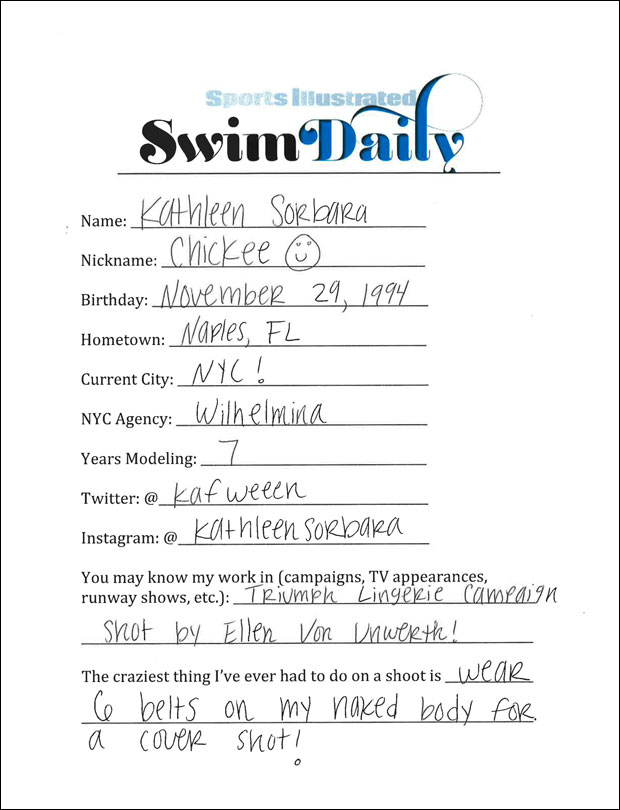
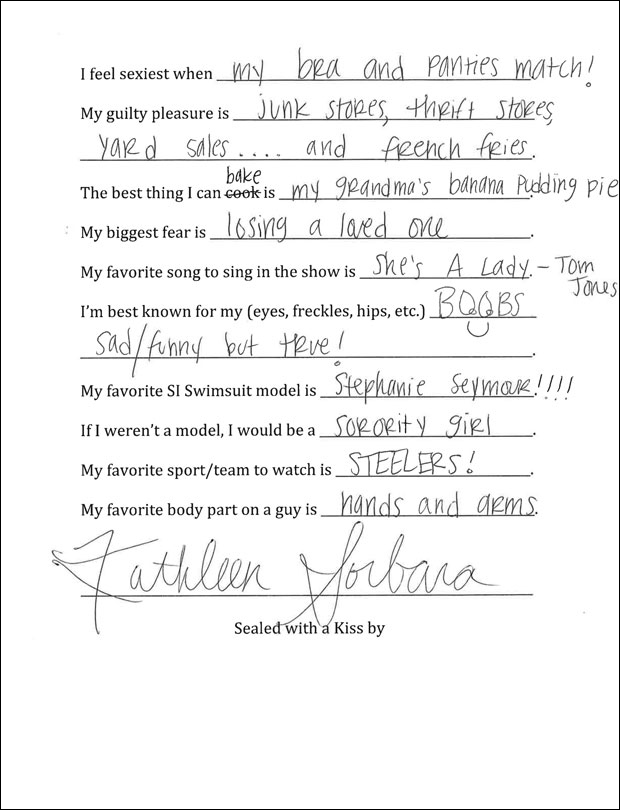
S.I. Swim Casting Call Source:http://www.si.com/swim-daily/2015/10/19/si-swimsuit-2016-casting-call-kathleen-sorbara

-
-
Happy Birthday you South African Goddess!
Luli Fama
Ph: Williams Bonbon
 And yes, that GIF has been posted 123723478 times. And I don't care. It gets better every time.
Yeah this bad boy is ready for Primetime. (bad boy meaning: Dat Ass)
And yes, that GIF has been posted 123723478 times. And I don't care. It gets better every time.
Yeah this bad boy is ready for Primetime. (bad boy meaning: Dat Ass) More Dani is all that matters. Even if VS screws up the photoshop.
Just going to sit here and wait for a Maxim shoot from her and Gilles.......
Well it is Miami..... I assume that's normal down there.
:dance:
Ph: Jared Thomas Source:http://www.jaredthomasphotography.com/studio There's more. Just waiting for the better quality versions....
More Dani is all that matters. Even if VS screws up the photoshop.
Just going to sit here and wait for a Maxim shoot from her and Gilles.......
Well it is Miami..... I assume that's normal down there.
:dance:
Ph: Jared Thomas Source:http://www.jaredthomasphotography.com/studio There's more. Just waiting for the better quality versions.... Striped Jumpsuit in Venice Ph: Derren Versoza Source:http://cami-morrone.com/striped-jumpsuit-in-venice/








































Account
Search
Configure browser push notifications
Chrome (Android)
- Tap the lock icon next to the address bar.
- Tap Permissions → Notifications.
- Adjust your preference.
Chrome (Desktop)
- Click the padlock icon in the address bar.
- Select Site settings.
- Find Notifications and adjust your preference.
Safari (iOS 16.4+)
- Ensure the site is installed via Add to Home Screen.
- Open Settings App → Notifications.
- Find your app name and adjust your preference.
Safari (macOS)
- Go to Safari → Preferences.
- Click the Websites tab.
- Select Notifications in the sidebar.
- Find this website and adjust your preference.
Edge (Android)
- Tap the lock icon next to the address bar.
- Tap Permissions.
- Find Notifications and adjust your preference.
Edge (Desktop)
- Click the padlock icon in the address bar.
- Click Permissions for this site.
- Find Notifications and adjust your preference.
Firefox (Android)
- Go to Settings → Site permissions.
- Tap Notifications.
- Find this site in the list and adjust your preference.
Firefox (Desktop)
- Open Firefox Settings.
- Search for Notifications.
- Find this site in the list and adjust your preference.