Limerlight
Members
-
Joined
Everything posted by Limerlight
-
 She still looks pre gud
 -
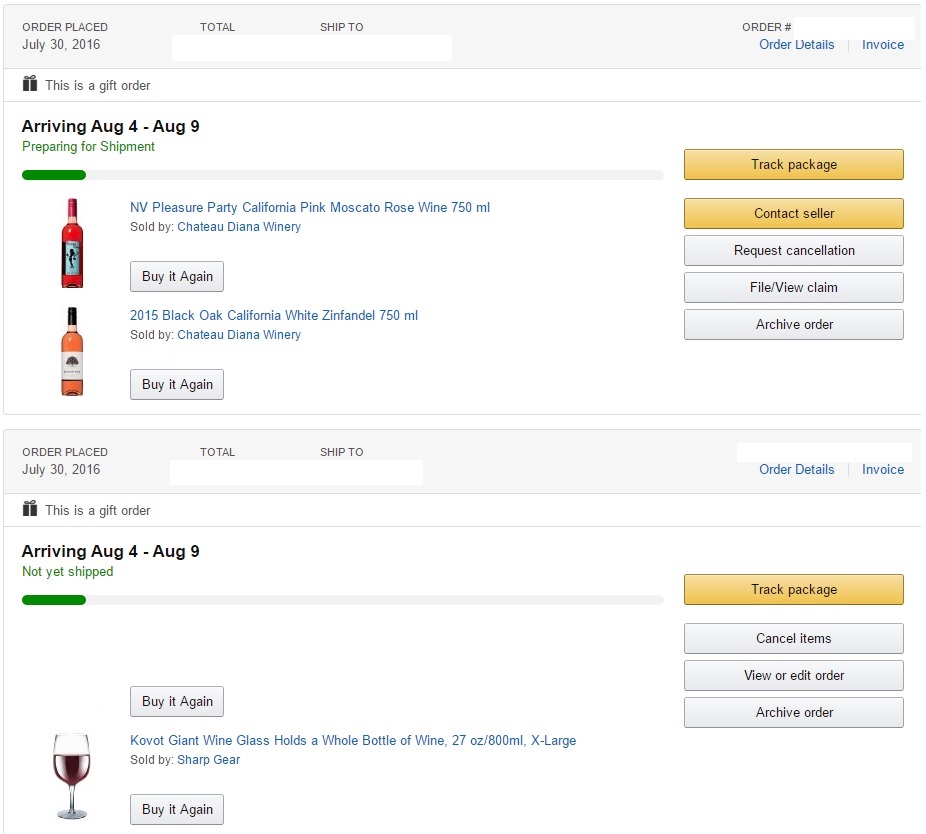
would wine work instead? SOMEONE *COUGH* @Prettyphile *cough* wanted a real owl at first...... 2 bottles of wine and a giant wine glass + special surprise present later....
-
I has sandwich
-
-
-
I bought some stuff for @Prettyphile's birthday in August
 Fucking windows 10 decided it doesn't wanna do anything today Removed the WoW Files but it's still there now won't uninstall Uninstalled the Battlenet app and now won't reinstall it.
FTFY
beer
Ask Pretty about her old 40 man raid days, or anything else like that. My best highlight was playing Diablo 2 for 22/24 hours then not sleeping playing another 10 hours then playing lacrosse, playing 6 more hours and crashing
Are you sending that to me muffin
Fucking windows 10 decided it doesn't wanna do anything today Removed the WoW Files but it's still there now won't uninstall Uninstalled the Battlenet app and now won't reinstall it.
FTFY
beer
Ask Pretty about her old 40 man raid days, or anything else like that. My best highlight was playing Diablo 2 for 22/24 hours then not sleeping playing another 10 hours then playing lacrosse, playing 6 more hours and crashing
Are you sending that to me muffin Fucking sick of hearing about Pokemon Go. Just like Flappy Bird give it it's two months and then people won't care anymore that's what I'm waiting for.
And if it is that role that he plays my pre-screening rating of the movie being a giant stinker will stand. I haven't seen it but i already rate it below a 5. Will I see it? Doubtful, cause fuck Will Smith movies. Men In Black not bad, Love Fresh Prince obvs, anything after that is unwatchable. Jared Leto may be the saving grace, but looks like a cross between a Venom addict and a Cocaine addict
Fucking sick of hearing about Pokemon Go. Just like Flappy Bird give it it's two months and then people won't care anymore that's what I'm waiting for.
And if it is that role that he plays my pre-screening rating of the movie being a giant stinker will stand. I haven't seen it but i already rate it below a 5. Will I see it? Doubtful, cause fuck Will Smith movies. Men In Black not bad, Love Fresh Prince obvs, anything after that is unwatchable. Jared Leto may be the saving grace, but looks like a cross between a Venom addict and a Cocaine addictAccount
Navigation
Search
Configure browser push notifications
Chrome (Android)
- Tap the lock icon next to the address bar.
- Tap Permissions → Notifications.
- Adjust your preference.
Chrome (Desktop)
- Click the padlock icon in the address bar.
- Select Site settings.
- Find Notifications and adjust your preference.
Safari (iOS 16.4+)
- Ensure the site is installed via Add to Home Screen.
- Open Settings App → Notifications.
- Find your app name and adjust your preference.
Safari (macOS)
- Go to Safari → Preferences.
- Click the Websites tab.
- Select Notifications in the sidebar.
- Find this website and adjust your preference.
Edge (Android)
- Tap the lock icon next to the address bar.
- Tap Permissions.
- Find Notifications and adjust your preference.
Edge (Desktop)
- Click the padlock icon in the address bar.
- Click Permissions for this site.
- Find Notifications and adjust your preference.
Firefox (Android)
- Go to Settings → Site permissions.
- Tap Notifications.
- Find this site in the list and adjust your preference.
Firefox (Desktop)
- Open Firefox Settings.
- Search for Notifications.
- Find this site in the list and adjust your preference.