Skip to content

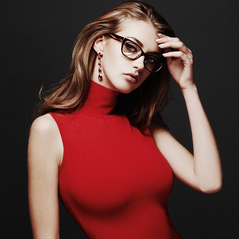
Megan Williams

Featured Replies

Looks like she did another shoot for Guess.  :clap:

Megan Williams & Karmay Ngai (by Chen Man) for Guess Holiday Campaign, 2014


post-85913-0-1446121150-28976_thumb.jpg post-85913-0-1446121150-33741_thumb.jpg post-85913-0-1446121150-43946_thumb.jpg post-85913-0-1446121150-45371_thumb.jpg 


(Sorry, but couldn't find better quality)

Why I didn't see this thread before  :chicken:


I like her!! 

  • Author

Thank you, Mary Fernandes.  Very interesting campaign!

Nice, way better Lebron, thanks ;)

Moar pls! She's looking great.

So glad to see the adds to Megan's thread.  She has a wonderful face and a fantastic figure.  Can't wait to see what she does in the future!  The red dress in the Guess campaign is SPECIAL.  ;)

  • Author

guess

3 days ago

The #GUESSGirls are a vision in black in Barcelona ✨

post-46718-0-22666300-1414418212_thumb.j

First time I'm noticing her incredibly cute beauty mark. Cant believe vs remove that in photoshop   :beating:

post-87593-0-66879900-1414420145_thumb.j


  • Author

First time I'm noticing her incredibly cute beauty mark. Cant believe vs remove that in photoshop   :beating:

attachicon.gifmegan.jpg


Oh, it took me a second to realize what you meant.  Yeah, it's nice.  Selena Gomez has one like that too.

  • Author

Guess Holiday Campaign 2014 HQ

Ph: Chen Man

lq adds

post-46718-0-22225100-1414681412_thumb.jpost-46718-0-96344500-1414681409_thumb.jpost-46718-0-11609900-1414681411_thumb.jpost-46718-0-01442900-1414681408_thumb.j

Join the conversation

You can post now and register later. If you have an account, sign in now to post with your account.

Guest
Reply to this topic...

Recently Browsing 0

  • No registered users viewing this page.

Account

Navigation

Search

Search

Configure browser push notifications

Chrome (Android)
  1. Tap the lock icon next to the address bar.
  2. Tap Permissions → Notifications.
  3. Adjust your preference.
Chrome (Desktop)
  1. Click the padlock icon in the address bar.
  2. Select Site settings.
  3. Find Notifications and adjust your preference.