

Jade Bahr
Members
-
Joined
-
Last visited
Everything posted by Jade Bahr
-
 I don't know what the similarity is supposed to be between these two roles, other than the painted face lol
 -
Can't believe he was serious. First Tarantino, then PTA and now this.
-
^I wasn't aware there is a part 2 lol But I agree it will be tough to reach the original/Brandon Lee. Even though I'm not sure if Lee was such an exceptional actor or just "right" for this particular role. Plus his tragic death on set making the whole thing kinda... immortal ironicly. Don't think I know any other work of him.
-
I'm far from being a motherly type (actually never was) but this scene made me understand it... well at least for a blink lol Good lord Source
She and Leo Woodall are great in ONE DAY. Highly recommend to everyone to watch it!!!
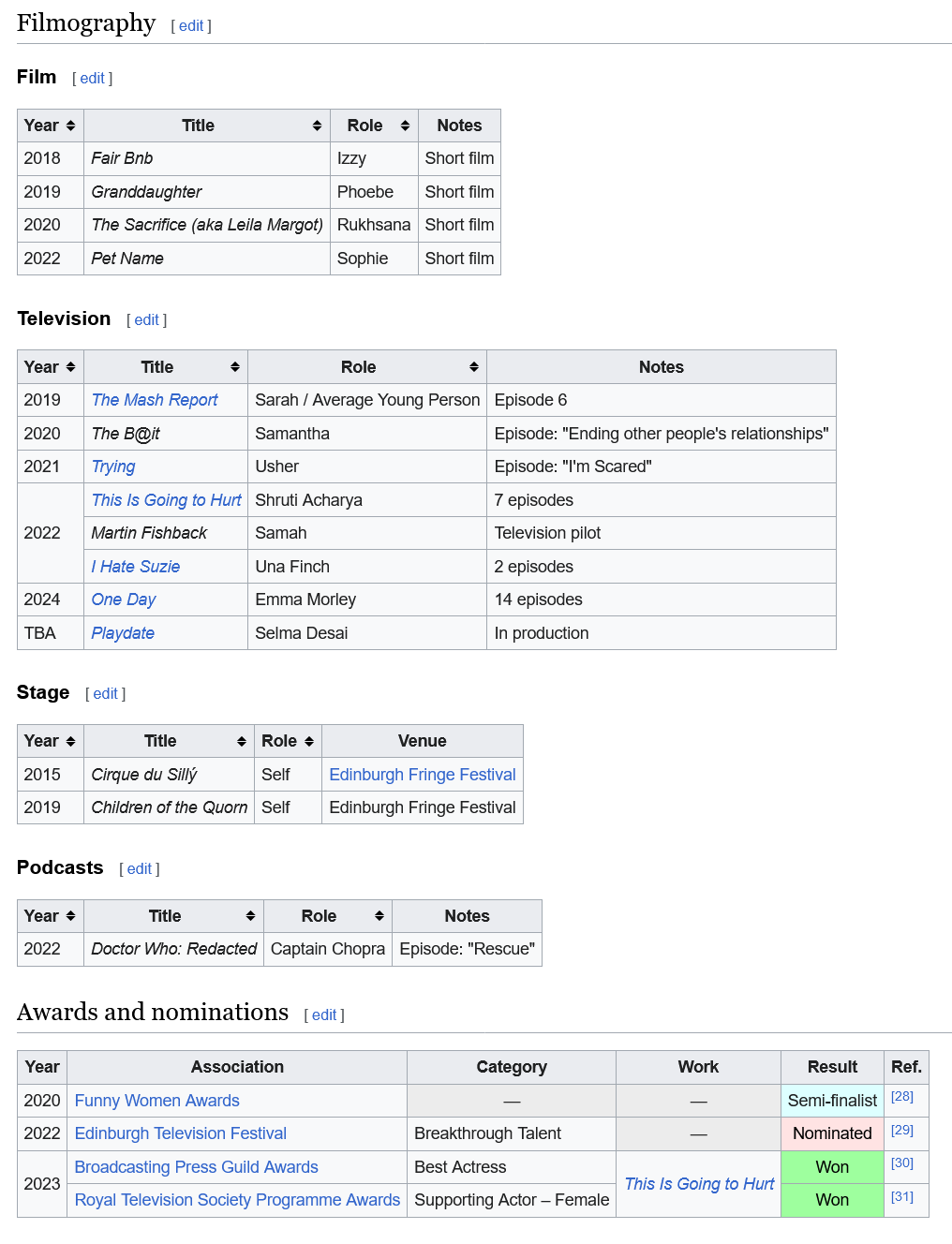
Ambika Bhakti Mod (born 2 October 1995) is a British actress, comedian, and writer. She is best known for her roles as Shruti Acharya in the BBC drama series This Is Going to Hurt (2022) and Emma Morley in the Netflix miniseries One Day (2024). Early life and education Mod grew up in Potters Bar, Hertfordshire. She is the daughter of Indian immigrants; her mother arrived in the UK as a child, and her father arrived in his 20s. She attended Dame Alice Owen's School. She graduated with a Bachelor of Arts degree in English Studies from St Mary's College, Durham. Mod grew up in Potters Bar, Hertfordshire. She is the daughter of Indian immigrants; her mother arrived in the UK as a child, and her father arrived in his 20s. She attended Dame Alice Owen's School. She graduated with a Bachelor oEarly in her career, she worked as a personal assistant at Condé Nast as her day job while doing comedy at night. Mod took lessons at Theatrix Performing Arts of St Albans, based at the Abbey Theatre in the city. While at Durham, Mod did acting and sketch comedy through the university's Revue, performing with Tom Harper at the 2015 Edinburgh Fringe Festival and serving as the troupe's President in 2017. She also performs improvised comedy at The Free Association in London. Mod formed a duo titled Megan from HR with Andrew Shires. She performs regularly at improvised comedy theatre The Free Association in London. Career Following a series of short films and supporting roles in television, in 2022 Mod appeared as a struggling junior doctor in Adam Kay’s medical comedy-drama, based on his memoir of the same name, This Is Going to Hurt alongside Ben Whishaw. The series, based around the experiences of doctors who work in gynaecology and obstetrics, earned critical acclaim. The Hollywood Reporter’s Daniel Fienberg praised Mod as the highlight among the "regular female characters" and added that she makes "Shruti’s earnest fragility into the show’s true heart", however, he criticised that "some of the series’ choices make her more trope than human, more an enabler for Adam’s journey than her own". Mod earned the Broadcasting Press Guild Award for Best Actress for her performance. In 2024, Mod played Emma Morley opposite Leo Woodall in Netflix's One Day, based on David Nicholls' novel of the same name. It tells the story of two young people who meet annually for twenty years following a platonic one-night stand together. Despite initially declining the character due to the intense nature of her role in This Is Going to Hurt and her doubts about portraying a romantic lead, Mod ultimately accepted the role. Reflecting on her decision later, she stated, "I think part of the reason why I just didn’t see myself playing that part was because insidiously and implicitly, that’s a message that I’ve been fed my entire life—that people who look like me aren’t romantic leads, that people who look like me aren’t the people who the male romantic lead will fall in love with". The series, along with her performance, received critical acclaim and the role proved to be a major breakthrough in Mod’s career. The series also became the most-watched globally during the week of February 12 with 9.9 million views. Writing for The Guardian, Chitra Ramaswamy lauded Mod as a "revelation" adding that "it is hard to believe this is her first lead role". While discussing her character's alteration in ethnicity from the novel and film, she expressed her hope that it would "open people's minds a little bit," stating that she is "aware how significant it will be to a lot of people, especially young women of colour, young South Asian women in particular". Mod will next play a lead role in the upcoming Disney+ thriller series, Playdate. Source: wikipedia
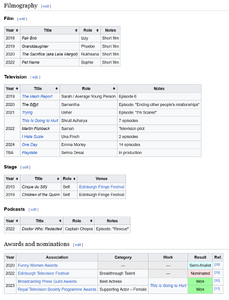 However Leo is finally back on set - or at least he's expected to be there anytime soon.
First one was great. Not sure what's left to tell in another one.
May the better of the sisters in mind win. However Emma will have lots of opportunities in the future Lily on the other hand... I'm not so sure.
At this point nothing can be worse than MADAME WEB right? 🤣
Of course it's partly because of Leos high salary. So the strike didn't change... anything? lol
Pls movie god let that happen 🙏
This is how a oscar nomination effects your career
Really curious about this remake.
FOR A SECOND I THOUGHT CRUISE AND PHOENIX HAD JOINED THE PTA MOVIE LMAO However it's more or less confirmed Cruise will be indeed in Tarantinos last movie: Tom Cruise Wants to “Return to Working With Auteurs Like Paul Thomas Anderson” After Jeff Sneider’s reporting about Tom Cruise potentially finding a role in Quentin Tarantino’s “The Movie Critic,” Variety is confirming the scoop.
However Leo is finally back on set - or at least he's expected to be there anytime soon.
First one was great. Not sure what's left to tell in another one.
May the better of the sisters in mind win. However Emma will have lots of opportunities in the future Lily on the other hand... I'm not so sure.
At this point nothing can be worse than MADAME WEB right? 🤣
Of course it's partly because of Leos high salary. So the strike didn't change... anything? lol
Pls movie god let that happen 🙏
This is how a oscar nomination effects your career
Really curious about this remake.
FOR A SECOND I THOUGHT CRUISE AND PHOENIX HAD JOINED THE PTA MOVIE LMAO However it's more or less confirmed Cruise will be indeed in Tarantinos last movie: Tom Cruise Wants to “Return to Working With Auteurs Like Paul Thomas Anderson” After Jeff Sneider’s reporting about Tom Cruise potentially finding a role in Quentin Tarantino’s “The Movie Critic,” Variety is confirming the scoop.








Account
Search
Configure browser push notifications
Chrome (Android)
- Tap the lock icon next to the address bar.
- Tap Permissions → Notifications.
- Adjust your preference.
Chrome (Desktop)
- Click the padlock icon in the address bar.
- Select Site settings.
- Find Notifications and adjust your preference.
Safari (iOS 16.4+)
- Ensure the site is installed via Add to Home Screen.
- Open Settings App → Notifications.
- Find your app name and adjust your preference.
Safari (macOS)
- Go to Safari → Preferences.
- Click the Websites tab.
- Select Notifications in the sidebar.
- Find this website and adjust your preference.
Edge (Android)
- Tap the lock icon next to the address bar.
- Tap Permissions.
- Find Notifications and adjust your preference.
Edge (Desktop)
- Click the padlock icon in the address bar.
- Click Permissions for this site.
- Find Notifications and adjust your preference.
Firefox (Android)
- Go to Settings → Site permissions.
- Tap Notifications.
- Find this site in the list and adjust your preference.
Firefox (Desktop)
- Open Firefox Settings.
- Search for Notifications.
- Find this site in the list and adjust your preference.