Jade Bahr
Members
-
Joined
-
Last visited
Everything posted by Jade Bahr
-
 This is gettin crazier and crazier LOL Paul Thomas Anderson's New Film Actually Costs $175 Million, Might Be Rated PG-13 and ... is NOT Vineland? So, it turns out that Paul Thomas Anderson’s new movie isn’t cheap. A source is telling Jeff Sneider that Warner Bros. greenlit PTA’s latest for the whopping sum of $175 million. Original reporting had it costing anywhere between $100-$125 million. Regardless, what an enormous gamble this is given that PTA’s most successful film (“There Will Be Blood”) only managed to make $76 million worldwide. Sure, this latest one has Leonardo DiCaprio in it, and is banking on a Summer 2025 rollout, in IMAX, no less, but it’s turned into the definition of a RISK. I’m not complaining. Give PTA as much money as he wants. Oh, and, supposedly, PTA’s latest might not even be “Vineland” after all. It could be very loosely based on it, in the same way that “The Master” was based on Pynchon’s “V,” but don’t expect a wall-to-wall adaptation of “Vineland.” In fact, PTA, apparently, came up with the story and worked on the script with his daughter, Lucy. That’s the word on the street. If you remember, back in 2018, PTA had confirmed that he was working on a script with his daughter who wasn’t happy with him only making R-rated films. “Well, I’m working right now on a story with my daughter Lucy. She’s 8. She has taken it upon herself, realizing that if I wasn’t going to do it, she would do it with me,” Anderson said. “We’re trying to hash out something right now. It’s a good collaboration too. It keeps you on your toes.” Anderson explained that, per usual, he was trying to take the unspecified story to darker places but that Lucy prevented him from doing so. This aligns well with rumors that it could be PTA’s most “mainstream” film to date. What we’ve noticed so far, from on-set leaks, is that the film is action-heavy, with lots of car chase scenes. I mean, did we really expect Warner Bros to greenlight an R-rated $175 million film directed by Paul Thomas Anderson? It’s, of course, still a possibility — Warner CEO David Zaslav has done wilder things during his tenure as head honcho of Warners, but these latest whispers tell me that PTA is making a very commercial PG-13 film.
Life sign!
This is gettin crazier and crazier LOL Paul Thomas Anderson's New Film Actually Costs $175 Million, Might Be Rated PG-13 and ... is NOT Vineland? So, it turns out that Paul Thomas Anderson’s new movie isn’t cheap. A source is telling Jeff Sneider that Warner Bros. greenlit PTA’s latest for the whopping sum of $175 million. Original reporting had it costing anywhere between $100-$125 million. Regardless, what an enormous gamble this is given that PTA’s most successful film (“There Will Be Blood”) only managed to make $76 million worldwide. Sure, this latest one has Leonardo DiCaprio in it, and is banking on a Summer 2025 rollout, in IMAX, no less, but it’s turned into the definition of a RISK. I’m not complaining. Give PTA as much money as he wants. Oh, and, supposedly, PTA’s latest might not even be “Vineland” after all. It could be very loosely based on it, in the same way that “The Master” was based on Pynchon’s “V,” but don’t expect a wall-to-wall adaptation of “Vineland.” In fact, PTA, apparently, came up with the story and worked on the script with his daughter, Lucy. That’s the word on the street. If you remember, back in 2018, PTA had confirmed that he was working on a script with his daughter who wasn’t happy with him only making R-rated films. “Well, I’m working right now on a story with my daughter Lucy. She’s 8. She has taken it upon herself, realizing that if I wasn’t going to do it, she would do it with me,” Anderson said. “We’re trying to hash out something right now. It’s a good collaboration too. It keeps you on your toes.” Anderson explained that, per usual, he was trying to take the unspecified story to darker places but that Lucy prevented him from doing so. This aligns well with rumors that it could be PTA’s most “mainstream” film to date. What we’ve noticed so far, from on-set leaks, is that the film is action-heavy, with lots of car chase scenes. I mean, did we really expect Warner Bros to greenlight an R-rated $175 million film directed by Paul Thomas Anderson? It’s, of course, still a possibility — Warner CEO David Zaslav has done wilder things during his tenure as head honcho of Warners, but these latest whispers tell me that PTA is making a very commercial PG-13 film.
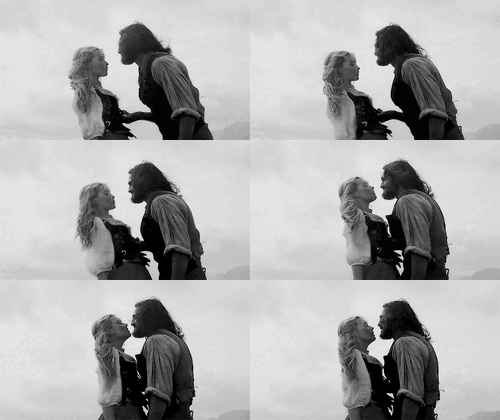
Life sign! I like the director's cut slightly better than the theatrical cut simply because it shows the attack of Pearl Harbor more brutally aka more how it was and not the trivialized/romanticized kids version. However in this version they cutted most of the scene with Danny and Evelyn at the beach what is a bummer because I really like this scene. It's so tender and aesthetically beautiful and one of their only peaceful moments as a couple together.
Hunger Magazine (2024)
I would watch anything with this man 😏🍀 Even when the irish sugar is looking like this 😄🐧 Great transformation Maybe he'll get a shot at the emmys.
Nicholas Galitzine photographed by Sam Nixon for THE FACE (x)
L'OFFICIEL HOMMES Issue Fall 2023
https://www.numeromag.nl/in-conversation-with-nicholas-galitzine/
Photographed by Edward Cooke for Schön! Magazine
Tings Magazine #5
PHOTOGRAPHED BY ZEB DAEMEN FOR STYLE MAGAZINE ITALIA
Behind The Blinds Magazine SS23
Man About Town Magazine 2020
Flaunt Magazine by Jason Hetherington (2021)
Nicholas Galitzine photographed by Bartek Szmigulski for Wonderland, Autumn/Fall 2022
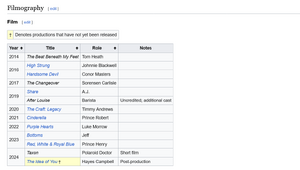
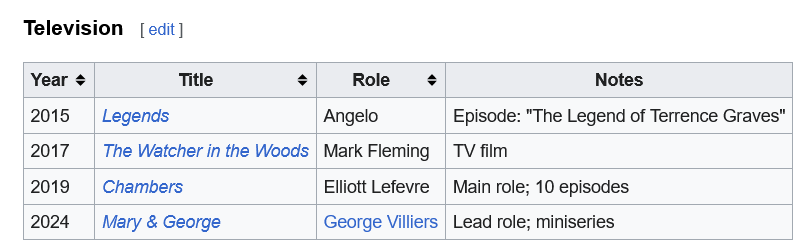
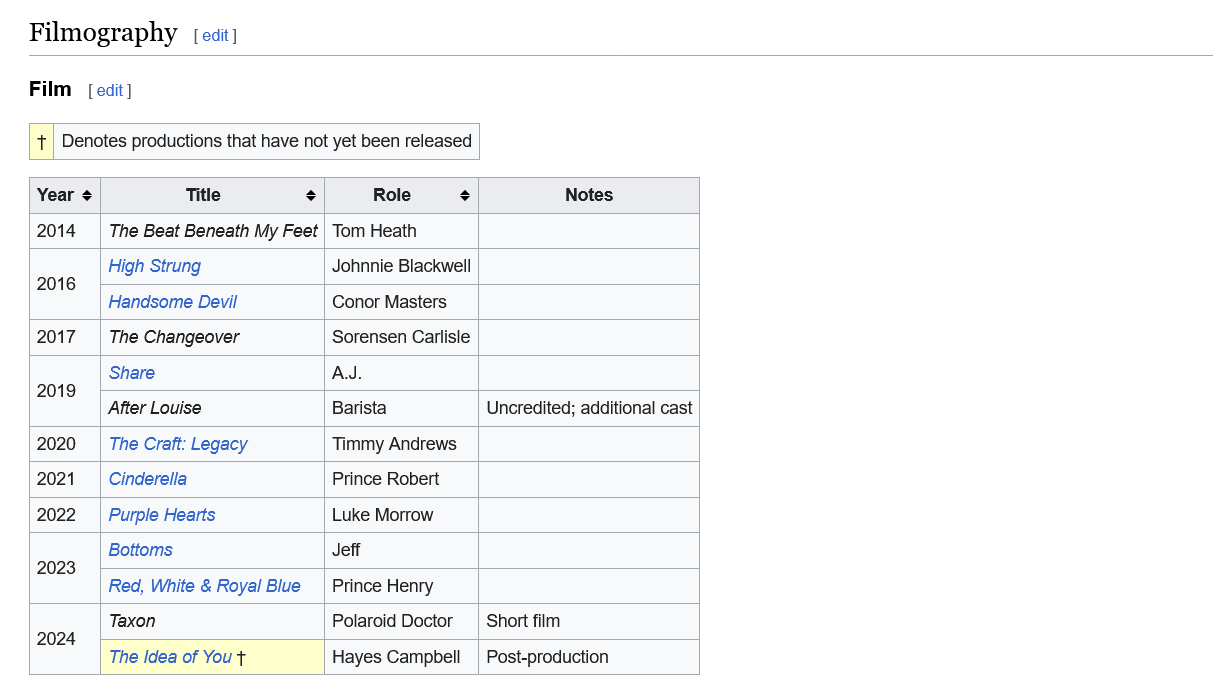
Nicholas Dimitri Constantine Galitzine (born 29 September 1994) is an English actor. He is best known for starring in the romantic films Purple Hearts (2022) and Red, White & Royal Blue (2023), and the comedy Bottoms (2023). After appearing in an episode of the television series Legends in 2015, he had lead roles in the 2016 teen films High Strung and Handsome Devil. He later starred in the supernatural horror film The Craft: Legacy (2020) and the musical film Cinderella (2021), also contributing to the latter's accompanying soundtrack. Early life Nicholas Dimitri Constantine Galitzine was born on 29 September 1994 in Hammersmith, London, England. His father, Geoffrey Leo Alexander Galitzine, is an entrepreneur and a former financier in the city of London, whose business interests include a glass-recycling business. His mother, Lora Maria Konstantina Papayanni,[5] is of Greek descent.[6] His sister, Lexi Galitzine, is an illustrator and interior stylist. Nicholas's grandfather changed his name from Edward Ralph Alexander Tier to Edward Ralph Alexander Galitzine on 9 April 1956. Nicholas's antecedents are all British on his father's side. Galitzine attended Dulwich College. In his childhood, Galitzine played rugby and football, and participated in county-level athletics competitions. He played for the Harlequins Academy until an injury to his rotator cuff made him stop playing sport. Career Galitzine got his first role in the film The Beat Beneath My Feet in 2014, starring alongside Luke Perry. He also performed several songs for the original soundtrack of the movie. In 2015 he appeared in one episode of the TV series Legends. He was named "Star of Tomorrow" by Screen International. In 2016, he starred in the American drama High Strung, in which he played a young violinist who performs in a subway station. He played a young closeted gay student in the Irish comedy-drama Handsome Devil, which was later nominated for five awards at the 15th Irish Film & Television Awards. In 2017 he took part in the New Zealand mystery drama The Changeover. In The Watcher in the Woods, he played opposite the Academy Award-winning American actress, Anjelica Huston. Galitzine was cast for his first major TV role in the Netflix horror drama series Chambers. In 2019, he played in the drama film Share. In 2020 he played the bisexual teenager Timmy in The Craft: Legacy, which is a sequel to The Craft. In 2021, he played Prince Robert in the musical film Cinderella, appearing on seven songs on the soundtrack of movie. His debut single "Comfort" was released on 24 June 2022. He also starred in the Netflix movie Purple Hearts, which was released on 29 July 2022. In 2023 Galitzine portrayed high-school football player Jeff in Emma Seligman's sex comedy film Bottoms. He also starred as one of the leads in the gay romantic comedy film Red, White & Royal Blue, based on the 2019 novel of the same name; he portrays the fictional Prince Henry of England opposite Taylor Zakhar Perez. In 2024, Galitzine starred as George Villiers in the SkyTV historical psychodrama series Mary & George, alongside Julianne Moore. The 7-episode series dropped on SkyTV in the UK and Binge in Australia on 5 March 2024, and is set to drop for streaming on Starz in the US on 5 April 2024. He also stars alongside Anne Hathaway in the movie The Idea of You, based on the book of the same name, where he portrays a member of a fictional boy band who enters into a relationship with Hathaway's character. The movie will stream worldwide on Amazon Prime on 2 May 2024. On 6 March 2024, Amazon dropped a single from the movie's fictitious boy band. The song is titled "Dance Before We Walk". Other ventures In 2023 Galitzine was named the first global menswear ambassador for the luxury fashion house Fendi. In the same year, he modeled for the brand's Menswear Fall/Winter 2023-24 global campaign. Source: wikipedia
I like the director's cut slightly better than the theatrical cut simply because it shows the attack of Pearl Harbor more brutally aka more how it was and not the trivialized/romanticized kids version. However in this version they cutted most of the scene with Danny and Evelyn at the beach what is a bummer because I really like this scene. It's so tender and aesthetically beautiful and one of their only peaceful moments as a couple together.
Hunger Magazine (2024)
I would watch anything with this man 😏🍀 Even when the irish sugar is looking like this 😄🐧 Great transformation Maybe he'll get a shot at the emmys.
Nicholas Galitzine photographed by Sam Nixon for THE FACE (x)
L'OFFICIEL HOMMES Issue Fall 2023
https://www.numeromag.nl/in-conversation-with-nicholas-galitzine/
Photographed by Edward Cooke for Schön! Magazine
Tings Magazine #5
PHOTOGRAPHED BY ZEB DAEMEN FOR STYLE MAGAZINE ITALIA
Behind The Blinds Magazine SS23
Man About Town Magazine 2020
Flaunt Magazine by Jason Hetherington (2021)
Nicholas Galitzine photographed by Bartek Szmigulski for Wonderland, Autumn/Fall 2022
Nicholas Dimitri Constantine Galitzine (born 29 September 1994) is an English actor. He is best known for starring in the romantic films Purple Hearts (2022) and Red, White & Royal Blue (2023), and the comedy Bottoms (2023). After appearing in an episode of the television series Legends in 2015, he had lead roles in the 2016 teen films High Strung and Handsome Devil. He later starred in the supernatural horror film The Craft: Legacy (2020) and the musical film Cinderella (2021), also contributing to the latter's accompanying soundtrack. Early life Nicholas Dimitri Constantine Galitzine was born on 29 September 1994 in Hammersmith, London, England. His father, Geoffrey Leo Alexander Galitzine, is an entrepreneur and a former financier in the city of London, whose business interests include a glass-recycling business. His mother, Lora Maria Konstantina Papayanni,[5] is of Greek descent.[6] His sister, Lexi Galitzine, is an illustrator and interior stylist. Nicholas's grandfather changed his name from Edward Ralph Alexander Tier to Edward Ralph Alexander Galitzine on 9 April 1956. Nicholas's antecedents are all British on his father's side. Galitzine attended Dulwich College. In his childhood, Galitzine played rugby and football, and participated in county-level athletics competitions. He played for the Harlequins Academy until an injury to his rotator cuff made him stop playing sport. Career Galitzine got his first role in the film The Beat Beneath My Feet in 2014, starring alongside Luke Perry. He also performed several songs for the original soundtrack of the movie. In 2015 he appeared in one episode of the TV series Legends. He was named "Star of Tomorrow" by Screen International. In 2016, he starred in the American drama High Strung, in which he played a young violinist who performs in a subway station. He played a young closeted gay student in the Irish comedy-drama Handsome Devil, which was later nominated for five awards at the 15th Irish Film & Television Awards. In 2017 he took part in the New Zealand mystery drama The Changeover. In The Watcher in the Woods, he played opposite the Academy Award-winning American actress, Anjelica Huston. Galitzine was cast for his first major TV role in the Netflix horror drama series Chambers. In 2019, he played in the drama film Share. In 2020 he played the bisexual teenager Timmy in The Craft: Legacy, which is a sequel to The Craft. In 2021, he played Prince Robert in the musical film Cinderella, appearing on seven songs on the soundtrack of movie. His debut single "Comfort" was released on 24 June 2022. He also starred in the Netflix movie Purple Hearts, which was released on 29 July 2022. In 2023 Galitzine portrayed high-school football player Jeff in Emma Seligman's sex comedy film Bottoms. He also starred as one of the leads in the gay romantic comedy film Red, White & Royal Blue, based on the 2019 novel of the same name; he portrays the fictional Prince Henry of England opposite Taylor Zakhar Perez. In 2024, Galitzine starred as George Villiers in the SkyTV historical psychodrama series Mary & George, alongside Julianne Moore. The 7-episode series dropped on SkyTV in the UK and Binge in Australia on 5 March 2024, and is set to drop for streaming on Starz in the US on 5 April 2024. He also stars alongside Anne Hathaway in the movie The Idea of You, based on the book of the same name, where he portrays a member of a fictional boy band who enters into a relationship with Hathaway's character. The movie will stream worldwide on Amazon Prime on 2 May 2024. On 6 March 2024, Amazon dropped a single from the movie's fictitious boy band. The song is titled "Dance Before We Walk". Other ventures In 2023 Galitzine was named the first global menswear ambassador for the luxury fashion house Fendi. In the same year, he modeled for the brand's Menswear Fall/Winter 2023-24 global campaign. Source: wikipedia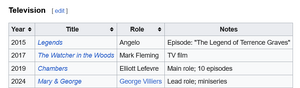



Account
Navigation
Search
Configure browser push notifications
Chrome (Android)
- Tap the lock icon next to the address bar.
- Tap Permissions → Notifications.
- Adjust your preference.
Chrome (Desktop)
- Click the padlock icon in the address bar.
- Select Site settings.
- Find Notifications and adjust your preference.
Safari (iOS 16.4+)
- Ensure the site is installed via Add to Home Screen.
- Open Settings App → Notifications.
- Find your app name and adjust your preference.
Safari (macOS)
- Go to Safari → Preferences.
- Click the Websites tab.
- Select Notifications in the sidebar.
- Find this website and adjust your preference.
Edge (Android)
- Tap the lock icon next to the address bar.
- Tap Permissions.
- Find Notifications and adjust your preference.
Edge (Desktop)
- Click the padlock icon in the address bar.
- Click Permissions for this site.
- Find Notifications and adjust your preference.
Firefox (Android)
- Go to Settings → Site permissions.
- Tap Notifications.
- Find this site in the list and adjust your preference.
Firefox (Desktop)
- Open Firefox Settings.
- Search for Notifications.
- Find this site in the list and adjust your preference.