

kimflorida
Members
-
Joined
-
Last visited
Everything posted by kimflorida
-

-
Where on Instagram or Pinterest??
https://www.establishedmodels.com/women/1469-born/
https://www.madmodels.es/models/1735-frederika-krenzelokova https://www.instagram.com/frederikakrenzelokova
https://www.instagram.com/toma.koroll/?hl=en
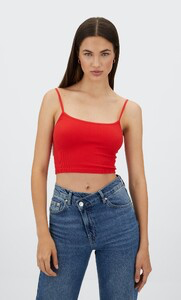 https://www.instagram.com/_puppeee/
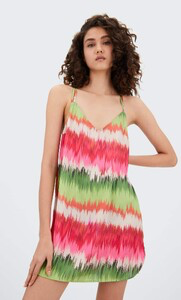 https://www.mostwantedmodels.com/creators/2319-agy-g/ https://www.instagram.com/agnieszkagasiorek
https://models.com/models/anastasia-orlova https://www.instagram.com/orlova.anastasia_
https://www.instagram.com/tarazoewoltjes/
https://www.instagram.com/tarazoewoltjes/
I think, https://www.instagram.com/michellexaviier/?hl=en
https://www.euromodel.nl/models/102-natalie-altevogt https://www.instagram.com/nataliepaulin_
https://www.instagram.com/anaisgarnierbe/?hl=en Also, ID'd here...
I believe she is the same model who was ID'd in this thread...
https://nextmanagement.com/new-york/women/profile/ana-margarida-vilas-boas https://www.instagram.com/margaridavilasboas
https://www.modellink.se/modellink/model/anna-chan https://www.instagram.com/anna_chanchan
https://www.instagram.com/guyue0814/ https://imgmodels.com/directory/new-york/yue-gu/
https://www.mostwantedmodels.com/creators/2319-agy-g/ https://www.instagram.com/agnieszkagasiorek
https://models.com/models/anastasia-orlova https://www.instagram.com/orlova.anastasia_
https://www.instagram.com/tarazoewoltjes/
https://www.instagram.com/tarazoewoltjes/
I think, https://www.instagram.com/michellexaviier/?hl=en
https://www.euromodel.nl/models/102-natalie-altevogt https://www.instagram.com/nataliepaulin_
https://www.instagram.com/anaisgarnierbe/?hl=en Also, ID'd here...
I believe she is the same model who was ID'd in this thread...
https://nextmanagement.com/new-york/women/profile/ana-margarida-vilas-boas https://www.instagram.com/margaridavilasboas
https://www.modellink.se/modellink/model/anna-chan https://www.instagram.com/anna_chanchan
https://www.instagram.com/guyue0814/ https://imgmodels.com/directory/new-york/yue-gu/
Account
Navigation
Search
Configure browser push notifications
Chrome (Android)
- Tap the lock icon next to the address bar.
- Tap Permissions → Notifications.
- Adjust your preference.
Chrome (Desktop)
- Click the padlock icon in the address bar.
- Select Site settings.
- Find Notifications and adjust your preference.
Safari (iOS 16.4+)
- Ensure the site is installed via Add to Home Screen.
- Open Settings App → Notifications.
- Find your app name and adjust your preference.
Safari (macOS)
- Go to Safari → Preferences.
- Click the Websites tab.
- Select Notifications in the sidebar.
- Find this website and adjust your preference.
Edge (Android)
- Tap the lock icon next to the address bar.
- Tap Permissions.
- Find Notifications and adjust your preference.
Edge (Desktop)
- Click the padlock icon in the address bar.
- Click Permissions for this site.
- Find Notifications and adjust your preference.
Firefox (Android)
- Go to Settings → Site permissions.
- Tap Notifications.
- Find this site in the list and adjust your preference.
Firefox (Desktop)
- Open Firefox Settings.
- Search for Notifications.
- Find this site in the list and adjust your preference.