Candyliz
Members
-
Joined
-
Last visited
Everything posted by Candyliz
-
 Stories mariana_zaragoza_19085160_1695846927384094_8732797273123061760_n.mp4

-
-
Old picture taken by a fan when they were engaged
 Stories behatiprinsloo_19085139_639688009561556_2385046488234328064_n.mp4 behatiprinsloo_15496531_1918322778420765_1951236322978955264_n.mp4 behatiprinsloo_15057746_1502344716497583_5926014799199600640_n.mp4

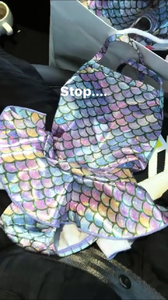
 As the picture say: "Zuri thinks" so don't worry !
Stories behatiprinsloo_18420758_1675980126042967_7794351059295535104_n.mp4
As the picture say: "Zuri thinks" so don't worry !
Stories behatiprinsloo_18420758_1675980126042967_7794351059295535104_n.mp4 Unseen post
:((((((( Bee please hear our prayers!!!
Dustyyyyy behatiprinsloo_18420829_1481653245191532_5526161186552283136_n.mp4
Unseen post
:((((((( Bee please hear our prayers!!!
Dustyyyyy behatiprinsloo_18420829_1481653245191532_5526161186552283136_n.mp4


Account
Navigation
Search
Configure browser push notifications
Chrome (Android)
- Tap the lock icon next to the address bar.
- Tap Permissions → Notifications.
- Adjust your preference.
Chrome (Desktop)
- Click the padlock icon in the address bar.
- Select Site settings.
- Find Notifications and adjust your preference.
Safari (iOS 16.4+)
- Ensure the site is installed via Add to Home Screen.
- Open Settings App → Notifications.
- Find your app name and adjust your preference.
Safari (macOS)
- Go to Safari → Preferences.
- Click the Websites tab.
- Select Notifications in the sidebar.
- Find this website and adjust your preference.
Edge (Android)
- Tap the lock icon next to the address bar.
- Tap Permissions.
- Find Notifications and adjust your preference.
Edge (Desktop)
- Click the padlock icon in the address bar.
- Click Permissions for this site.
- Find Notifications and adjust your preference.
Firefox (Android)
- Go to Settings → Site permissions.
- Tap Notifications.
- Find this site in the list and adjust your preference.
Firefox (Desktop)
- Open Firefox Settings.
- Search for Notifications.
- Find this site in the list and adjust your preference.