
Tania82
Members
-
Joined
-
Last visited
Everything posted by Tania82
-
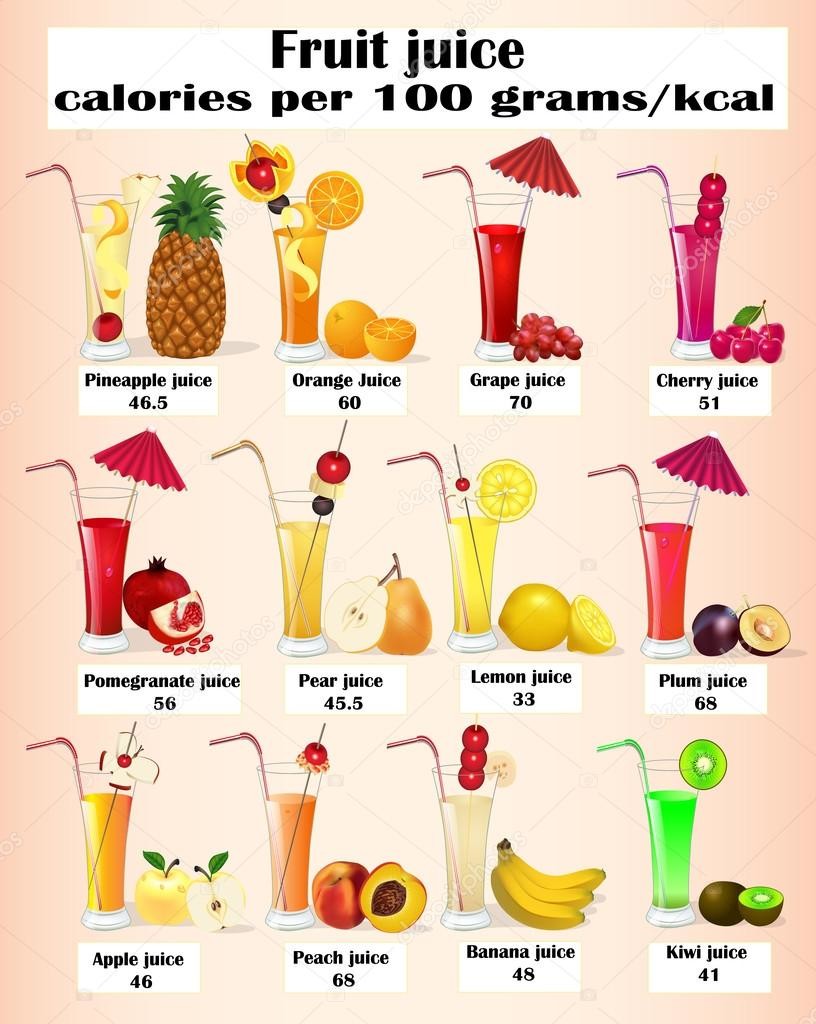
Not really. You have to eat more vegetables, fruits, juices, salads, and go to gym, walk run, swim, do exercise; less chocolat, alcohol drinks and sneaks to less weight. And drink more water and tea.
 I AM HAPPY! I will start to work in airport again!
Yes, of course, but always sun shines again Have you ever played the guitar?
Molly's game (2017) Not really like it
Yes, they are cute, caring and expressive, and clean.
Agatha Christie is good forever!
Lemon, pineapple, orange, strawberry juices Good, fresh and light :D
Ays, y siempre resulta que la propia personalidad y forma de ser predomina más que una actuación, no se puede fingir siempre, la gente a veces entiende lo que no es, etiquetan a veces a quién no es bueno/a de eso, y los que sí lo somos, a veces, nos ponen de los malo/as o de lo/as que no se portan bien. Y yo puedo parecerme a alguien pero hasta cierto punto, yo creo que la gente a veces se piensa cosas de mí que no son y cosas que son, y la verdad, hay que asumir que aunque se quiera ser perfecto/as, no lo somos, pero también saber hasta que punto entrar en x juego y hasta que punto fingir lo que se es y no se es.
COME ON, MORE FRUITS, JUICES AND LIQUIDS!
But now I haven' t boyfriend
I am tired, but happy, and hopeful!
I AM HAPPY! I will start to work in airport again!
Yes, of course, but always sun shines again Have you ever played the guitar?
Molly's game (2017) Not really like it
Yes, they are cute, caring and expressive, and clean.
Agatha Christie is good forever!
Lemon, pineapple, orange, strawberry juices Good, fresh and light :D
Ays, y siempre resulta que la propia personalidad y forma de ser predomina más que una actuación, no se puede fingir siempre, la gente a veces entiende lo que no es, etiquetan a veces a quién no es bueno/a de eso, y los que sí lo somos, a veces, nos ponen de los malo/as o de lo/as que no se portan bien. Y yo puedo parecerme a alguien pero hasta cierto punto, yo creo que la gente a veces se piensa cosas de mí que no son y cosas que son, y la verdad, hay que asumir que aunque se quiera ser perfecto/as, no lo somos, pero también saber hasta que punto entrar en x juego y hasta que punto fingir lo que se es y no se es.
COME ON, MORE FRUITS, JUICES AND LIQUIDS!
But now I haven' t boyfriend
I am tired, but happy, and hopeful!
Account
Navigation
Search
Configure browser push notifications
Chrome (Android)
- Tap the lock icon next to the address bar.
- Tap Permissions → Notifications.
- Adjust your preference.
Chrome (Desktop)
- Click the padlock icon in the address bar.
- Select Site settings.
- Find Notifications and adjust your preference.
Safari (iOS 16.4+)
- Ensure the site is installed via Add to Home Screen.
- Open Settings App → Notifications.
- Find your app name and adjust your preference.
Safari (macOS)
- Go to Safari → Preferences.
- Click the Websites tab.
- Select Notifications in the sidebar.
- Find this website and adjust your preference.
Edge (Android)
- Tap the lock icon next to the address bar.
- Tap Permissions.
- Find Notifications and adjust your preference.
Edge (Desktop)
- Click the padlock icon in the address bar.
- Click Permissions for this site.
- Find Notifications and adjust your preference.
Firefox (Android)
- Go to Settings → Site permissions.
- Tap Notifications.
- Find this site in the list and adjust your preference.
Firefox (Desktop)
- Open Firefox Settings.
- Search for Notifications.
- Find this site in the list and adjust your preference.