jj3
Members
-
Joined
Everything posted by jj3
-
 That's a good question ... I'm not sure, but his whole celebration remind me the one from Ronaldinho
 -
#BlancaPadilla wears #BALMAINPF16 to attend party during Paris Fashion Week #BALMAINARMY, 07.07.16

 @camille_chaudeurge_photography@jutemagazine @outlawsmodels
 ^ I watched that everydays of the week during the dinner
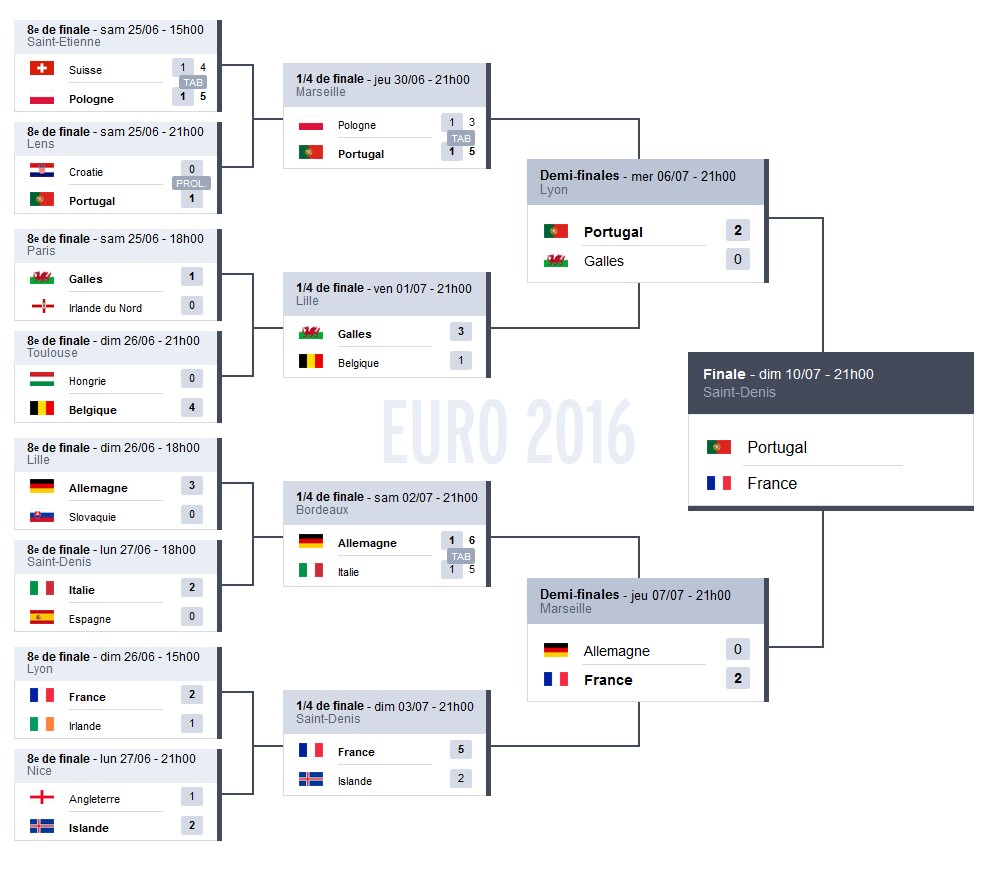
FINGERS CROSSED for tonight !
^ I watched that everydays of the week during the dinner
FINGERS CROSSED for tonight ! Thanks for the updates
BTS
Thanks for the updates
BTS



 But where is her Khalasar ???
My 90s: - VHS - Walkman - Super NES - Michael Jackson - Dragon Ball Z - France 98 (football) ...and so many other stuff like these ones
^
#StreetStyle #Paris
But where is her Khalasar ???
My 90s: - VHS - Walkman - Super NES - Michael Jackson - Dragon Ball Z - France 98 (football) ...and so many other stuff like these ones
^
#StreetStyle #Paris
Account
Search
Configure browser push notifications
Chrome (Android)
- Tap the lock icon next to the address bar.
- Tap Permissions → Notifications.
- Adjust your preference.
Chrome (Desktop)
- Click the padlock icon in the address bar.
- Select Site settings.
- Find Notifications and adjust your preference.
Safari (iOS 16.4+)
- Ensure the site is installed via Add to Home Screen.
- Open Settings App → Notifications.
- Find your app name and adjust your preference.
Safari (macOS)
- Go to Safari → Preferences.
- Click the Websites tab.
- Select Notifications in the sidebar.
- Find this website and adjust your preference.
Edge (Android)
- Tap the lock icon next to the address bar.
- Tap Permissions.
- Find Notifications and adjust your preference.
Edge (Desktop)
- Click the padlock icon in the address bar.
- Click Permissions for this site.
- Find Notifications and adjust your preference.
Firefox (Android)
- Go to Settings → Site permissions.
- Tap Notifications.
- Find this site in the list and adjust your preference.
Firefox (Desktop)
- Open Firefox Settings.
- Search for Notifications.
- Find this site in the list and adjust your preference.