Jump to content
View in the app

A better way to browse. Learn more.

Bellazon

A full-screen app on your home screen with push notifications, badges and more.

To install this app on iOS and iPadOS
  1. Tap the Share icon in Safari
  2. Scroll the menu and tap Add to Home Screen.
  3. Tap Add in the top-right corner.
To install this app on Android
  1. Tap the 3-dot menu (⋮) in the top-right corner of the browser.
  2. Tap Add to Home screen or Install app.
  3. Confirm by tapping Install.

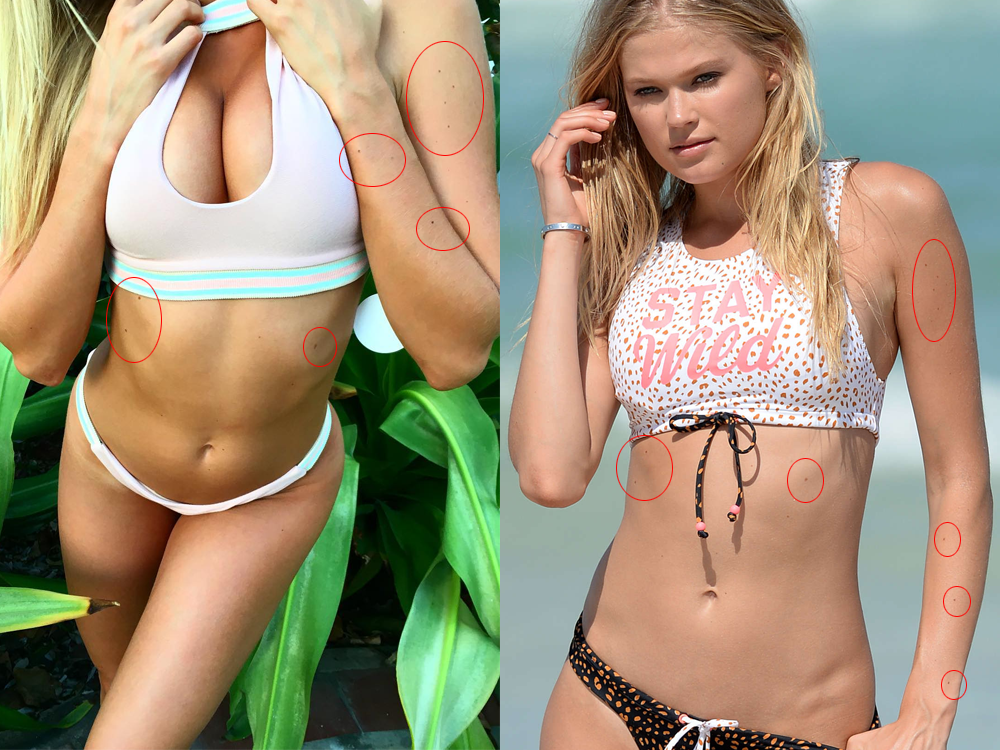
MarVS2

Members
  • Joined

  • Last visited

Everything posted by MarVS2

  1. She is a rookie for SI swim 17 she is on location right now
  2. oh this one? ur welcome
  3. what vid
  4. ya i was going to say that , Cabrini dont bring danielle and lorena rae to Mj comments because its worst .
  5. wondering who is the photographer @ peroxideblonde mhhmm
  6. that emily d fan is reading from here im sure
  7. btw but wierd that Mj diddnt said rookie number 1 tho... but it is Vita for sure!
  8. thats perfection shot EXACTLY MOLES frist rookie Vita done bitches we made it again
  9. Sanni the fist pic u put the angle is wierd and the other her arm looks too dark look what i posted
  10. guys we need candids hd of Vita sidorkina asap
  11. Clauds in the october special location with me , Bellemere is going to be our photographer lmao
  12. no she have lots of freckels plus not moles on stomach and hopefully she is not back lol
  13. i was thinking gigi too but i think she have more moles . i searched liz turner its not her either . this girl have 3 small moles on her arm and 2 on ribs part
  14. Btw Gigi latest post on IG is a pic of SI taggin them . i think she will be back.
  15. i guess they are planning a very very special photoshott in october tho maybe cover worthy
  16. on latest Darcie pic darciebaum@jamesmacari all I have to say is October is going to be ?
  17. idk now Europe is kinda dangerous because ISIS now especially France
  18. here is the vid

Account

Navigation

Search

Configure browser push notifications

Chrome (Android)
  1. Tap the lock icon next to the address bar.
  2. Tap Permissions → Notifications.
  3. Adjust your preference.
Chrome (Desktop)
  1. Click the padlock icon in the address bar.
  2. Select Site settings.
  3. Find Notifications and adjust your preference.