Matt!
Members
-
Joined
-
Last visited
Everything posted by Matt!
-
 😭😭😭
😭😭😭 -
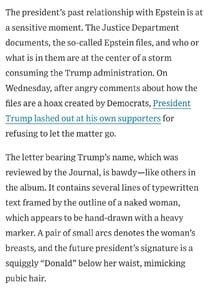
Now they need to publish the article. I wonder what other creepy stuff they've found.
-
Donald in panic mode. Play stupid games, win stupid prizes.
-
Big push from Elmo
-
You’re 100% in a cult.
-
https://variety.com/2025/film/news/jared-leto-sexual-misconduct-allegations-tron-ares-1236428475/
-
There you have it.
There is a conflict between two fictional nations in the movie, but the script was written long before the Israel - Gaza war began, so it’s definitely not based on that. Also, its a solid movie, you should go see it.
Account
Search
Configure browser push notifications
Chrome (Android)
- Tap the lock icon next to the address bar.
- Tap Permissions → Notifications.
- Adjust your preference.
Chrome (Desktop)
- Click the padlock icon in the address bar.
- Select Site settings.
- Find Notifications and adjust your preference.
Safari (iOS 16.4+)
- Ensure the site is installed via Add to Home Screen.
- Open Settings App → Notifications.
- Find your app name and adjust your preference.
Safari (macOS)
- Go to Safari → Preferences.
- Click the Websites tab.
- Select Notifications in the sidebar.
- Find this website and adjust your preference.
Edge (Android)
- Tap the lock icon next to the address bar.
- Tap Permissions.
- Find Notifications and adjust your preference.
Edge (Desktop)
- Click the padlock icon in the address bar.
- Click Permissions for this site.
- Find Notifications and adjust your preference.
Firefox (Android)
- Go to Settings → Site permissions.
- Tap Notifications.
- Find this site in the list and adjust your preference.
Firefox (Desktop)
- Open Firefox Settings.
- Search for Notifications.
- Find this site in the list and adjust your preference.