Skip to content

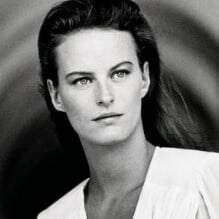
Sarah Monrose

Featured Replies

Sarah Monrose is an 80s/90s model, represented by Marilyn and Storm Models.

She is currently still a model, she also does photography.

https://elliottbrownagency.co.uk/talent/sarah-monrose/

https://www.instagram.com/sarahmonrose.photography/?hl=en

Height: 1.78

Bust: 88

Waist: 60

Hips: 90

Shoes: 39

Hair: Black

Eyes: Brown

Image hidden for guestsSign in to view Image hidden for guestsSign in to view

modelcomposites.com

  • Author

J. Francois Charles 1988 - PH. STEPHANE SEDNAOU - VOGUE IT ARCHIVE

133.jpg.3cec3b62303319a88227cdb0e0410ce8.jpg

  • Author

COSMOPOLITAN UK, Aug 1989 - PH. UNK - MAGAZINECANTEEN

Image hidden for guestsSign in to view

  • Author

BLITZ UK, Mar 1991 - PH. PETER BROWN - WEB FIND + JENNIFER BROWN, VANESSA

Image hidden for guestsSign in to view Image hidden for guestsSign in to view

  • Author

Random images from the web:

Image hidden for guestsSign in to view Image hidden for guestsSign in to view il_570xN.2054077136_d20k.jpg Image hidden for guestsSign in to view

  • Author

Sophie Sitbon SS 1989 - PH. UNK - BELLAZON

Screenshot 2025-12-16 182412.png

  • Author

YSL SS 1988 - PH. UNK - BELLAZON

ys888-.jpg.3dbdbb1103540685c1023466e6695f41.jpg

  • Author

PANTHEON GR, 12 Dec 1988 - PH. UNK - MY SCANS

03-PANTHEONGR-12Dec1988-m.SarahMonrose-ph.Unk.jpg Image hidden for guestsSign in to view Image hidden for guestsSign in to view 06-PANTHEONGR-12Dec1988-m.SarahMonrose-ph.Unk.jpg

07-PANTHEONGR-12Dec1988-m.SarahMonrose-ph.Unk.jpg Image hidden for guestsSign in to view

  • 10 months later...

Join the conversation

You can post now and register later. If you have an account, sign in now to post with your account.

Guest
Reply to this topic...

Recently Browsing 0

  • No registered users viewing this page.

Account

Navigation

Search

Search

Configure browser push notifications

Chrome (Android)
  1. Tap the lock icon next to the address bar.
  2. Tap Permissions → Notifications.
  3. Adjust your preference.
Chrome (Desktop)
  1. Click the padlock icon in the address bar.
  2. Select Site settings.
  3. Find Notifications and adjust your preference.