

Matt!
Members
-
Joined
-
Last visited
Everything posted by Matt!
-
 I really don't understand why the current administration is glorifying this s***.
 -
No love for Bibi
-
They’re awesome on the huge screen in 3D, but the magic kinda dies when you watch them at home on TV.
-
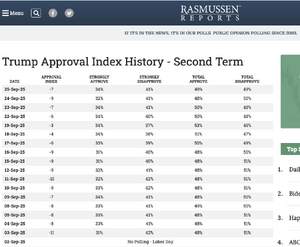
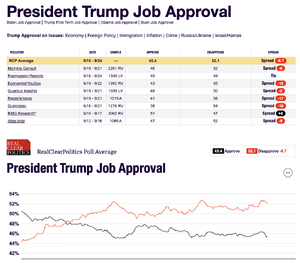
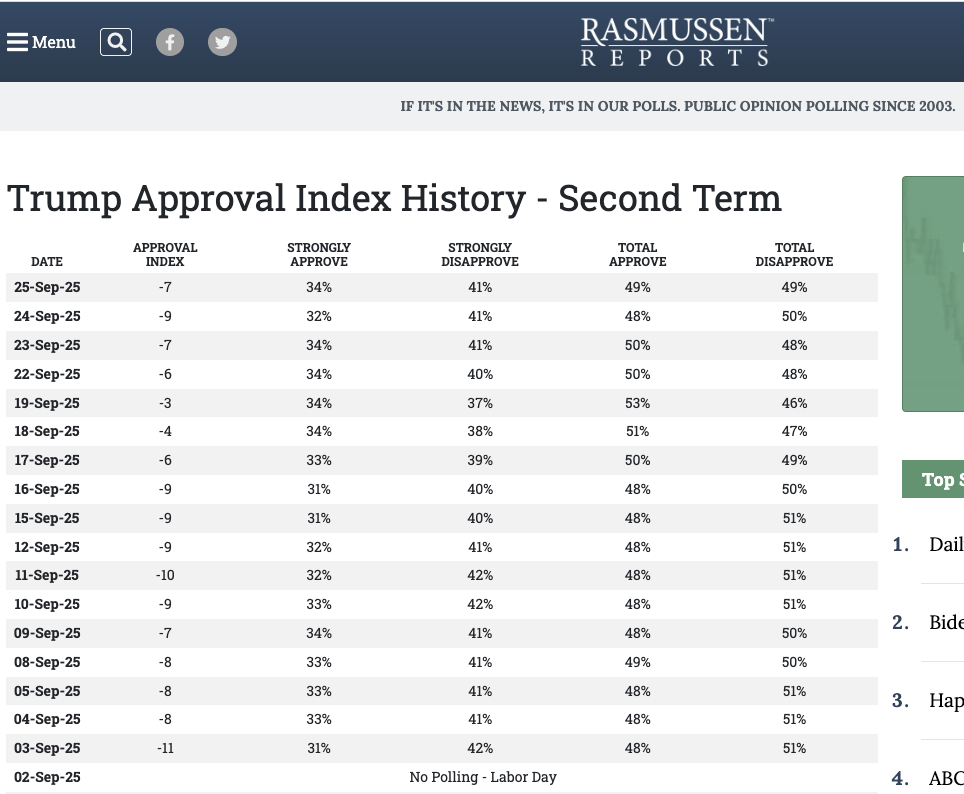
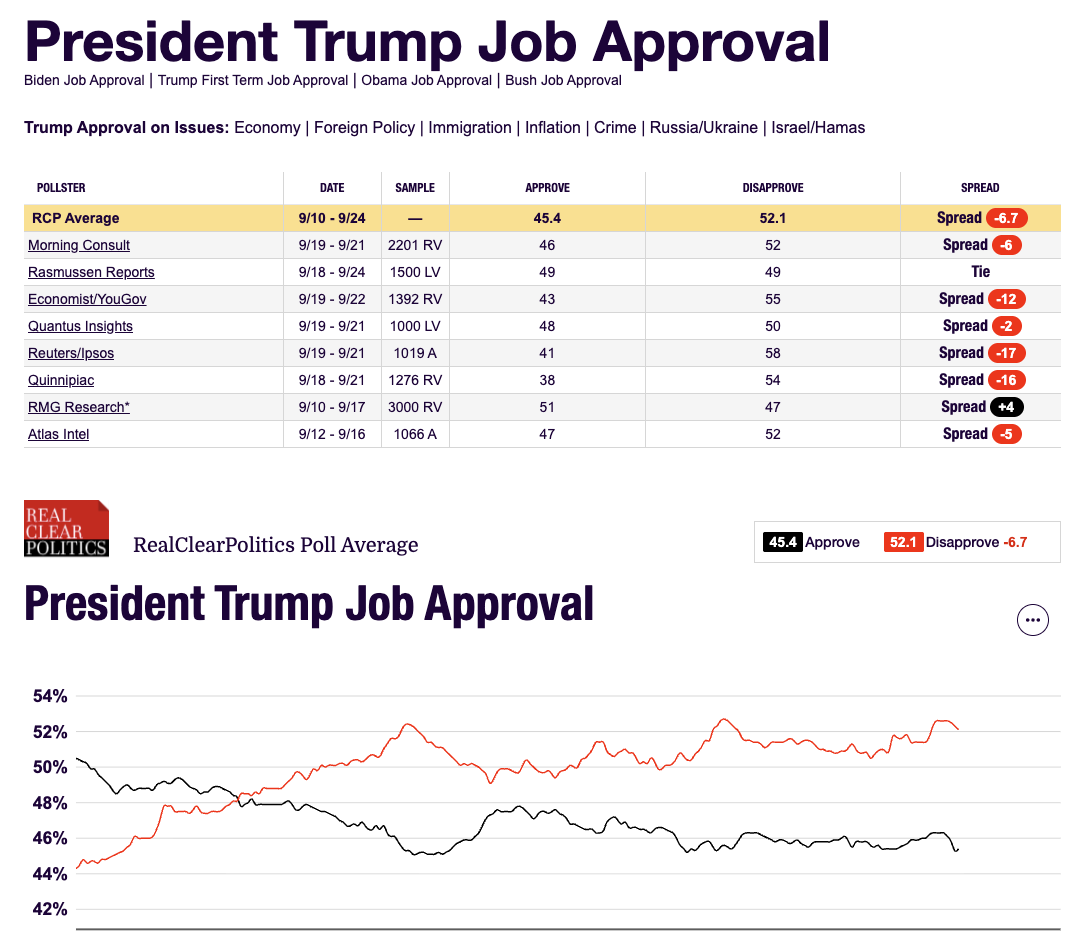
https://www.rasmussenreports.com/public_content/politics/trump_administration_second_term/trump_approval_index_history_second_term https://www.realclearpolling.com/polls/approval/donald-trump/approval-rating 57.11% ?

-
-
-
Madison Beer - yes baby (Behind The Scenes)
-
Well damn
-
I'm going to hell for this
-
These former Buckeyes… @Stromboli1
-
Opening Night Ceremony of the 21st Zurich Film Festival













 Ph. Okcreativeproduction


 I hope so too! $130M budget = ~$325M to break even (2.5x budget), so with a $50M WW opening, it’ll need strong legs. But with reviews this good, it might just overperform. also..
Kushi Leggo: Face: 0 Body: 0 Fandom: 0 Zhenya Katava : Face: 7 Body: 4 Fandom: 7 Valeriya Lapidus: Face: 3 Body: 6 Fandom: 3 Charly Jordan: Face: 0 Body: 0 Fandom: 0
It's getting worse and worse.
I hope so too! $130M budget = ~$325M to break even (2.5x budget), so with a $50M WW opening, it’ll need strong legs. But with reviews this good, it might just overperform. also..
Kushi Leggo: Face: 0 Body: 0 Fandom: 0 Zhenya Katava : Face: 7 Body: 4 Fandom: 7 Valeriya Lapidus: Face: 3 Body: 6 Fandom: 3 Charly Jordan: Face: 0 Body: 0 Fandom: 0
It's getting worse and worse. Make Argentina Great Again.
W
W employees, big fat L DOGE.
Make Argentina Great Again.
W
W employees, big fat L DOGE.


































Account
Search
Configure browser push notifications
Chrome (Android)
- Tap the lock icon next to the address bar.
- Tap Permissions → Notifications.
- Adjust your preference.
Chrome (Desktop)
- Click the padlock icon in the address bar.
- Select Site settings.
- Find Notifications and adjust your preference.
Safari (iOS 16.4+)
- Ensure the site is installed via Add to Home Screen.
- Open Settings App → Notifications.
- Find your app name and adjust your preference.
Safari (macOS)
- Go to Safari → Preferences.
- Click the Websites tab.
- Select Notifications in the sidebar.
- Find this website and adjust your preference.
Edge (Android)
- Tap the lock icon next to the address bar.
- Tap Permissions.
- Find Notifications and adjust your preference.
Edge (Desktop)
- Click the padlock icon in the address bar.
- Click Permissions for this site.
- Find Notifications and adjust your preference.
Firefox (Android)
- Go to Settings → Site permissions.
- Tap Notifications.
- Find this site in the list and adjust your preference.
Firefox (Desktop)
- Open Firefox Settings.
- Search for Notifications.
- Find this site in the list and adjust your preference.