Candyliz
Members
-
Joined
-
Last visited
Everything posted by Candyliz
-
 And we could have the first Behandice meeting after pregnancy
 -
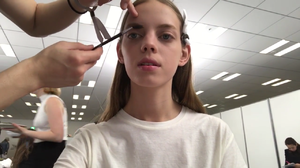
She talked about how was her experience walking for Dior in Japan She shows her travel to Japan, backstage and after party. Said that she was a little bit confused because Dior's stage was so long but she did it very well











-
Mariana has a new video in her Youtube channel
-
I'm waiting for a confirmation from Bee. Lily has confirmed that she'll be there.
-
Stories mariana_zaragoza_15257048_1658799317748423_4690078173830840320_n.mp4


-
More backstage Mariana for mexican desgner Carlos Pineda
 Mariana at Dior's after party in Japan
 Next Monday.
I don't know why she have all those injuries
Mariana for Dazed Magazine
Next Monday.
I don't know why she have all those injuries
Mariana for Dazed Magazine Mariana and their family while they were in Japan
 Stories behatiprinsloo_18116978_1921576441447709_8691528006117621760_n.mp4
 Haha I know don't worry but hope she can do that
Account
Navigation
Search
Configure browser push notifications
Chrome (Android)
- Tap the lock icon next to the address bar.
- Tap Permissions → Notifications.
- Adjust your preference.
Chrome (Desktop)
- Click the padlock icon in the address bar.
- Select Site settings.
- Find Notifications and adjust your preference.
Safari (iOS 16.4+)
- Ensure the site is installed via Add to Home Screen.
- Open Settings App → Notifications.
- Find your app name and adjust your preference.
Safari (macOS)
- Go to Safari → Preferences.
- Click the Websites tab.
- Select Notifications in the sidebar.
- Find this website and adjust your preference.
Edge (Android)
- Tap the lock icon next to the address bar.
- Tap Permissions.
- Find Notifications and adjust your preference.
Edge (Desktop)
- Click the padlock icon in the address bar.
- Click Permissions for this site.
- Find Notifications and adjust your preference.
Firefox (Android)
- Go to Settings → Site permissions.
- Tap Notifications.
- Find this site in the list and adjust your preference.
Firefox (Desktop)
- Open Firefox Settings.
- Search for Notifications.
- Find this site in the list and adjust your preference.